View Menu
|
Both Tile mode and Object mode
|
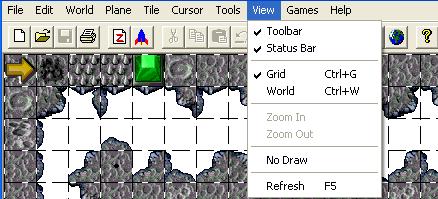
Toolbar (Checkmarked)
|
This feature when toggled will either hide or display the toolbar.
|
Statusbar (Checkmarked)
|
This feature when toggled will either hide or display the statusbar.
Mouse position in pixelz, tile X/Y coordinatez, tile number, etc.
|
|
Grid (Ctrl+G) (Checkmarked)
|
This feature when toggled will either hide or display the grid.
|
World (Ctrl+W)
|
This 'feature' does not appear to do anything for Gruntz, either in the Menu Bar or the Tool Bar.
|
|
The following only exist in Object mode
|
Move Up (Up Arrow)
|
This feature will scroll the level in the desired direction.
|
Move Left (Left Arrow)
|
This feature will scroll the level in the desired direction.
|
Move Right (Right Arrow)
|
This feature will scroll the level in the desired direction.
|
Move Down (Down Arrow)
|
This feature will scroll the level in the desired direction.
|
|
Custom Move Up (Alt+Up Arrow)
|
This will move the selected object To Be Determined pixels in the desired direction.
The number of pixels is determined by the Set Custom Move Values� feature.
|
Custom Move Left (Alt+Left Arrow)
|
This will move the selected object TBD pixels in the desired direction.
The number of pixels is determined by the Set Custom Move Values� feature.
|
Custom Move Right (Alt+Right Arrow)
|
This will move the selected object TBD pixels in the desired direction.
The number of pixels is determined by the Set Custom Move Values� feature.
|
Custom Move Down (Alt+Down Arrow)
|
This will move the selected object TBD pixels in the desired direction.
The number of pixels is determined by the Set Custom Move Values� feature.
|
Set Custom Move Values�
|
This feature will specify the number of pixels that an object is moved when using Custom Move.
It will open up a dialog box where you enter valuez for the four different directionz.
The valuez were all '20' when I checked ... perhapz defaultz, perhapz something I set long ago.
I now have them all set to '16' ... half a tile.
|
|
Both Tile mode and Object mode
|
Zoom In
|
Alwayz ghosted both in Menu Bar and Tool Bar ... this feature is not implemented.
|
Zoom Out
|
Alwayz ghosted both in Menu Bar and Tool Bar ... this feature is not implemented.
|
|
No Draw
|
This is self-explanatory. I think this feature was used for development only.
|
Refresh (F5)
|
This will redraw the screen. This is used for those rare cases when the display of your level seems messed up.
Using refresh will usually fix any drawing/display problems.
|